

 0
0


The Sony Ericsson w200 official topic
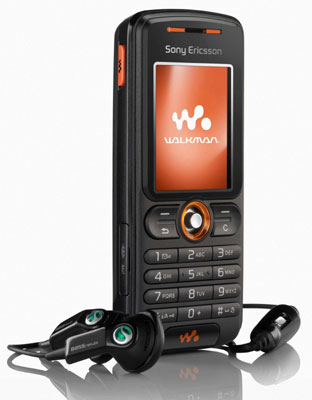
Because i couldn't find an official topic for the sony-ericsson w200 on the se-nse.com forums , i opend here hopping this will remain the only one ( and it won't be so scrambled over the forum ).
Here will be posted tutorials and stuff regarding this phone & other transitions like k310@w200 , k510@w200 & k320@w200.
Any questions are welcomed ( if the answer was not posted allready )
For now , i'll start whit some tutorials
1) Debranding / Changing firmware
*if you are new to all those terms , check "understanding your phone" , and the Begginers forum on se-nse
To debrand means taking off the brands of you're operator , with a new clean firmware . That's why debranding/changing firmware are about the same. ( changing firmware = upgrade the software version of the phone )
Before starting ,turn your phone off.
First of all you must have installed Sony Ericsson Pc Suite and Sony Ericsson Update Suite , else nothing will work. After those , download
 USB Signed Drivers for W200, and when prompt to install new software, dezarchive this thing , and select to search for the drivers inside the folder or better , try the Automatic USB Driver Installer
 ::: Debranding W200 - by DCU-60 cable for DB2010/DB2012 CID52 RED
// cid53 users check the bottom of the page
--> Download the necesary files for the flashing procces:
- setool2lite_v1[1].08
- W200_FS_MEDITERR_R4HA014_RED52_ONLY1.fbn(alternative link)
- W200_MAIN_GENERIC_R4HA014_RED52_ONLY1.mbn(alternative link)
- w200_Melinda_Generic_CDA102737_4_R1A_GENERIC_MEDITERR (alternative download link)
( u have to click on "Descarca acum" to download the files from netdrive.ws )
::: Backup ALL your phone information (Images, Videos, Contacts, Notes, etc.)
When we convert the phone, all the data will be erased (except for the sim contacts&memory stick files)
- MyPhoneExplorer - phone book&files manager ::: back-up software
- Now uncompress setool2lite_108.rar (this one in a new folder)
- Do not uncompress Melinda_Generic_CDA102737_4_R1A_GENERIC_MEDITERR , the ZIP archive has to remain intact for proper use;
- Enter the folder where we uncompressed "SeTool2" and excecute <setool2lt.exe>
- Close your Sony Ericsson W200 (turn off).
[Meanwhile in se-tool..]
- In Phone Type put W200
- Click on Read GDFS ( this will back up your GDFS. The GDFS is the most important thing in your phone , so we have to make a back up of it.. . If u damage the GDFS u can say goodbye to the phone , so be carrefull & never use the "write gdfs" option in Se-tool . Use it on your one risk ,or if u know what u are doing ! )
- Now ,after pressing Read GDFS , a dialog shows up in se-tool saying "Hold C and insert cable" . Press C in your phone and connect the USB cable.

- After in se-tool appears a message "Phone detached", unplug the phone, take out the battery for 3 seconds, then put the battery back.
- [Back to se-tool] In Files, click on ADD and we load the FS (W200_FS_MEDITERR_R4HA014_RED52_ONLY1.fbn) and the MAIN (W200_MAIN_GENERIC_R4HA014_RED52_ONLY1.mbn) files
- In MISC files we add the custom files ( in those are stored the language of the phone )(CDA) ( if u don't agree with the language in this custom pack , you can search for another pack that fits you're language needs )
- Click on FLASH ( now the process of flashing your phone begins ).
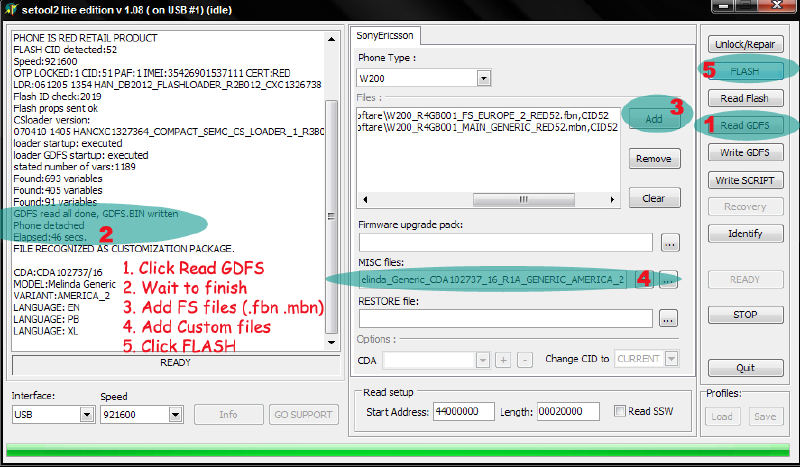
- We unplug the USB cable, , turn the phone on... and that's it! And don't forget to exit se-tool
// If u got an error message from se-tool where it was saying something about " CID 53 " , then u have a w200 Cid53 ,and u have to follow this steps in order to flash/debrand the phone. The other users that got ready with the "flashing with se-tool for cid52", can go further.
::: Debranding/Changing firmware for W200 CID53
1) Download FAR Manager (http://www.farmanager.com/)
2) Download JD Flasher
3) Extract JD Flasher into C:/Program Files/Far/Plugins
4) Start FAR Manager
5) Press F11
6) Choose "just da flasher"
//make sure script is "DB2012" and "DCU-60" is port. then press "jump down into a large rabbit hole"
7) Connect phone as you would SETOOL ( hold C , and plug-in the phone )
For MBN and FBN flashing ( firmware flashing ):
Choose "oflash"
Copy the following into the phone :
* ]W200_R4HA014_MAIN_GENERIC_ME_RED53.mbn
* W200_R4HA014_FS_MEDITERR_RED53.fbn
( for other fs / main / cda files browse www.iprotebe.cz)
For FS (file system) access: (for uploading camdrivers etc , customizations) (this is a bit like XS++ FSX)
Choose "ofs"
You now have access to your phone's filesystem on W200 CID53 RED!The customizations are posted below
First u must add the CDA ( customization )
* w200_Melinda_Generic_CDA102737_4_R1A_GENERIC_MEDITERR ( this cannot be added as whole archive , so dezarchive it , and follow the path in far manager , and after copy the files , whitout this you will get an "cofiguration error" meesage upon start-up)
Now you are ready to add the other cool stuff.
To end:
Choose ".." until a dialog appears, and choose yes.
Disconnect your phone
--------------customization-------------------
Every one of us whant's to get the best from his phone. After debranding it , u can now do things that weren't possible before because of the operator restrictions. You can now customize your phone.
2) Adding flash themes
Flash themes are composed of two files : the flash menu ( .swf ) and the theme itself ( .thm ) . Whithout the .thm file , the flash menu's won't work
Download :
- flash menu ( .swf)
- theme ( .thm)
To add flash files into the phone with se-tool u must respect the path.
To work , the swf. files must go in a certain folder from the phone , that respect a "path" like this one : "tpa/preset/system/desktop/flash" ( in the folder "flash" , u put the .swf files). After creating those folders , u create a zip archive of the "tpa/preset/system/desktop/flash" , and then u put it in MISC in Se-tool. Then u click Flash , press C ,connect cable , and wait for se-tool to upload the files. After the files are uploaded , turn the phone on , connect it to your usb cable , and using Phone Explorer upload the .thm files.
And you are ready to go
U can always add more flash menu's by the method shown above, they don't have to be a certain resolution , because the *.swf resizes to any screen ( for exmple a flash menu 240x320 will work on 128x160 too )
How to: Incorporate Standby SWF into THM files
later edit : more themes & more flash menus
seccond pack : here for themes , and here for flash menus ( swf + thm )
----------------------------------------------------------------------------------------------------------------------
3) Adding acoustic drivers
Acoustics goes to : "\ifs\settings\acoustic\" [ this is the "path" in your phone ]
Create a zip archive of Ifs , put it in Misc in Se-tool , and after u click on flash
The best part of the w200 , represents the sound
 . As a walkman phone , the sound is equal to an Ipod . But we can get even more from this phone
  .
. Unfortunately , most of the acoustics over the net ,arren't working very well whit the w200 , some of them even creating problems , like the distorsion of the sound when u listen to the radio , like the microfone that doesen't work on the headset..etc.
That's why ,i advice you tu use only the loudspeaker part of the acoustic pack , because it hasn't got any problems , and it affects only the sound on the speaker part ( now it's looooud
, about 2x & a half louder then the original one ). But if u know for sure that a certain pack works good too ,u can add it.-
.gif) loudness__toshara_1.6_.zip 6.45K
2720 downloads
loudness__toshara_1.6_.zip 6.45K
2720 downloads  (from toshara 1.6 pack) // loudness
-
bass___loudness__prashast_.zip 5.91K
3079 downloads  (from prashast pack ) // loudness + bass
updated : modders across the www created acoustic packs for w200 , one of them is Prashast Acoustics with his "THUMP MUSIC.......APF for W200, With Bass Flo & AYO Noise Reduction" . Greate sound , crystal clear ( a.k.a high definition sound ). Topic is here
thump_phf_new_revised2.zip - headset files // equilazer must be set as next : first bar @ maximum , last bar @ maximum level , the rest @ 0 level , so it will be set manual , not on any preset . Thump_farfied_with_new_Eq.zip - loudspeaker file ( the volume is good , no dissortion ) // equilazer must be set as next : first bar @ maximum , last bar @ maximum level , the rest @ 0 level , so it will be set manual , not on any preset .I saw that most of you guys after adding other acoustics (full packs ) that were not designed for the w200, are having problem with the sound ( like the mic that doesn't work in the handsfree, the sound that's not balanced on the radio .. ).
Here's what u have to do :
first ,u create a notepad file whit this text in it :
chdir:/ifs/settings/acoustic
listfiles:
- this command checks the acoustic directory , and lists the files
- after the files are listed , you copy them in notepad , where u leave only the *.apf files , like this :
ex: VHF_ring.apf
VHF_play.apf
VHF_hce-60_ring.apf
VHF_hce-60_play.apf
VHF_hce-60_call.apf
VHF_hca-60_ring.apf
..and then u put "DELFILE:" in front of every file
ex: delfile:VHF_ring.apf
delfile:VHF_play.apf
delfile:VHF_hce-60_ring.apf
delfile:VHF_hce-60_play.apf
delfile:VHF_hce-60_call.-60_ring.apf
here is the notepad command to delete the files :
 delete_audio.txt 2.75K
1245 downloads
delete_audio.txt 2.75K
1245 downloadsu save the notepad file with the "delfile" command , and u add it in MISc in Se-tool , u press write script , and..that's it
To check if everything has been deleted u create a new notepad file with this command :
chdir:/ifs/settings/acoustic
listfiles:
(..and u add it to misc in se tool..write script )
now the directory is clear , and u can load a new set of acoustic drivers.
acoustic_original_w200.zip 79.26K
740 downloads----------------------------------------------------------------------------------------------------------------------
4) -- You don't like how the walkman looks like?
Shore u can change even the skin of the walkman player--1. Dezarchive the folder "skinuri.rar"
2. Pick a skin ( U can create your own skin if u know how to edit pictures
 . You need 3 files :: fullscreen_back.gif *128x111 pixels* (is the background), list_background.gif *128x90 pixels*(is the background when u choose the melody ), low_back.gif *128x18 pixels*(is the scrool bar that shows the status of the melody))
3. add the files into a folder ( a path ) : tpa\system\multimedia\mp (you have an exemple into the archive i attached) then create a zip archive of the folder like this "tpa.zip"
--> walkman player skins ( for 128x160 ) :
skinuri.rar 133.07K
5769 downloads --> walkman player skin pack2 ( added 19.03.08 ) :
walkman_skins_pack2.zip 170.14K
4263 downloads ----------------------------------------------------------------------------------------------------------------------
5) Adding a camdriver
Camdrivers goes here : "ifs/settings/camera/"
Zip Archive of Ifs , put it in Misc in Se-tool , and after u click on flash
Sadly...
 but w200 has a VGA camera , and "the best vga of its kind" as they say
The camdriver 3.25 arrived , and here are the improvements :
-> true color function
-> fixed luminozity & clarity
-> the zoomed pictures at 320x240 come now more clearly
-> the senzor is now more sensible to light
-> less noise , it only appears when taking photos in very low-light enviroments ( especially in the night )
-- camdriver 3.25 ( high picture & video qualitty ) ( the good version )
:
camdriver_v3.25.zip 13.79K
3312 downloads -- camdriver 7.5 final version ( the final version developed by brazuka for w200 , fully working )
:
camdriver_7.5_final_version.zip 19.11K
2915 downloadsIf u need a camdriver that has a greate video ( shoots movie @ a maximum of 28fps ), then u should use camdriver 3.25. After adding more mhz to the driver ( from 13 to 48 mhz ) , a progress in the video has been observed. Now , in good light conditions the camera shoots a movie @ 20-25fps ( the maximum recorded was @ 28 fps ) , @ night it shoot arround 15-20 fps .
The decision is up to you . Many people said that v3.25 is better the v7.5 , but others prefered 7.5 instead.
Both of the camdrivers are fully working , the only thing is on 3.25 on video ( some desyncronizations appear , but more fps can be acheived ).
pictures taken with camdriver v3.25 :

Known facts about camdriver 3.25 ( this is the beta3 version ) : desyncronizations in video , in zoom 4x , & somethimes u need to restart the camera ( turn off , and then on ) to reset it's luminosity.
pictures taken with camdriver v7.5 :
(********* new ) Cybershot™ Vga Cam v2 ( <- download link)
The latest version brought by Brazuka for the w200. Now users can manually set they're own settings , configure Iso/fps speed , Sharpness , saturation and other settings , by just switching trough the Effects menu ( effects are now replaced by manual settings )
----------------------------------------------------------------------------------------------------------------------
6) Adding the display driver (w200 dispdriver)
The dispdriver goes to : "ifs/settings/display"
Zip Archive of Ifs , put it in Misc in Se-tool , and after u click on flash
A new display driver has been released.
Now the colors are more accentuated and more defined.
- here is the new display driver :
Display_Driver_W200_by_DarkSun.zip 1.27K
4347 downloads- here is the original dislpay driver :
Original.zip 1.09K
1395 downloads----------------------------------------------------------------------------------------------------------------------
7) Adding a new layout
The layout goest to : "\tpa\system\layout"
Zip Archive of Ifs , put it in Misc in Se-tool , and after u click on flash
The layout file , is the one that takes care about the standby screen..about the fonts , text..stuff like that .
Who doesn't like the data , time & operator logo , they can be removed by adding a new layout file
-->
layout_no_data___no_time___no_operator.zip 3.59K
1091 downloads--> Or u can keep the date & time , and just remove the logo operator :
layout_with_no_logo_operator.zip 3.59K
1922 downloads --> if u don't like it u can switch back to the original one :
layout_original.zip 5.01K
1349 downloadsto see the time&date u can wait untill the screensaver comes on , or u can go to pictures and view this flash file :
clock_date_in_flash.zip 13.64K
1677 downloads----------------------------------------------------------------------------------------------------------------------
8) Changing the normal screensaver , with a flash one
The shortcut* of the flash file goes to : "tpa\system\settings"
The flash file goes to : "usb\other"
At the end , u make a ZIP archive of both things ( togheter ) , put it in Misc , and after press Flash in Se-tool
Because w200 doesn't allow us to put flash files as screensavers , we must create a tweak for that. First , a shortcut that contains the address to the flash file. After that , the phone will put as default the flash screensaver choosen by u. If u don't like the flash file located in the zip Archive , don't worry , u don't have to reflash to gain another one. Just pick some of u're favorite flash files , and upload them to "other" folder in the phone . Then , rename them into "iphone" , and that's it , next time u'll lock your phone , u'll see u're flash file set as screensaver ( wallpaper as flash not recomanded , because of meny meny bugs )
-->
screensaver_flash.zip 61.18K
3557 downloads-->Flash Screensavers PacK <big collection> - nice sh*t
----------------------------------------------------------------------------------------------------------------------
9) Removing shutter (camera) sound
By replacing the internal shutter sound , with an empty one , u will get no sound when taking pictures in normal mode ( not only in silent mode ) . To do that , we have to replace camerashutter2 located here in "tpa\preset\system\sound" ( zip archive , add in Misc in Se-tool , press flash ). After u flash this archive to your phone , go to camera , select More , go to Shutter sound , and select Shutter sound 2 ( this is the empty one created by us )
-->
no_camera_shutter_sound.zip 780bytes
1398 downloads----------------------------------------------------------------------------------------------------------------------
10) Changing the display of the pictures ( 3x3 thumbnails , instead of 2x2 )
Some of you may have seen on other phones that the pictures are displayed 3x3 .
There's very simple how to do it. You only need to open notepad , add some values , and save them as "cutomize_upgrade.xml" . Then , the file is stored in tpa/preset/custom
( zip archive of tpa , add in misc in se-tool ,then press flash ).
After u add it into your phone , the photos should be displayed like this :
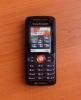
-->
3x3_thumbnails.zip 738bytes
2223 downloadsIf u don't like them , u can edit the customize_upgrade , and change the value to 2x2 instead of 3x3 .
----------------------------------------------------------------------------------------------------------------------
11) Changing the "phone name" ( Model info )
More simple than that it can't be. We've seen that editing the customize_upgrade.xml we can do a lot of things. Now we can even change the Model of the phone , from "W200i" to "My super cool-W200" ( lol ).
u just have to edit the customize_upgrade.xml as shown bellow.
Open an empty notepad , and past this info.
<?xml version="1.0" encoding="utf-8"?>
<customization>
<info>
<phone-name>W200i</phone-name>
</info>
</customization>
<phone-name>W200i</phone-name> -> this line changes the name of the phone ( replace "W200i" with whatever u want ). Then save the Notepad file as cutomize_upgrade.xml , and put it in a path like : "tpa/preset/custom". Then u add it to Misc in Se-tool , and u press flash
Exemple bellow :
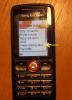
-->
changing_phone__s_name.zip 715bytes
1392 downloads----------------------------------------------------------------------------------------------------------------------
12)Activity menu ( now working on w200 too )
[/i]
The activity menu is that thing that show's u lost calls/messages ( events ) , but on w200 we know it as a simple "pop-up" menu . Well ,on newer phones , we have the Activity Menu , and besides the missed calls/sms , u can see what app is runing in background ( walkman , games , browser ) and u can easely resume it or end it
here are some pictures (most of u guys will remember what i'm talking about , especially k310 owners )


The problem is that on w200 , we don't have a button assigned for it , so now we will asign the UP-BUTTON (of the joystick )
so about the Activity menu..u can now find it in Settings -> General -> NEW EVENT , were you have 2 options, PoP-up(classical view) menu and Activity menu(the new cool thing) , and besides those , u can change the way Activity menu is displayed on w200 " vertical" or "horizontal" layout.
-->
Hamler_Certificate___Full_Activity_Menu___3_X_3_Thumbnails___Battery_Menu___Tech_Mode.zip 1.75K
2577 downloads (add it in misc in se-tool , then press flash ) // this one activates the Activity Menu ,and ads it to Up-button-->
settings___general___new_events.zip 92.58K
2916 downloads (add it in misc in se-tool , then press flash ) // this one , has to be added after the first one , it brings settings -> general -> new events and here u can customize the look of activity menu )- techmode details
- battery menu details
About the EQ halmer.As u saw , some app ask for permision every time u do something ( connect to internet , local file browsing ). This certificate allows u to remove those persmissions
simply u take the .jar file , and u add it in EQHalmer.exe.
if application that u want to set permission as neverask is in ur fone just remove that one and get ur java (.jar) file in EQHalmer folder and drag on EQHalmer.exe or rite clik on the .jar file n select halmer..... u can get .jad file for ur .jar.... copy both files in Phone/Other (not card/other) and install using .jad file now see in permissions u can get Never Ask option there and Ask once
-> EQ-Halmer (download)
---------------------------------------------------------------------------------------------------------
13) Tera Copy , copy 1Gb to w200 in just a few minutes ( insted of a few hours )
Nobody knows exactly what this program does , but it transfers the files to w200 very quickly. It probably uses some other protocols , that makes the transfer speed from 120kb/s up to 700-800 kb/s
You just have to put your phone in "File transfer" mode
Download link : Tera copy
---------------------------------------------------------------------------------------------------------
14) Patching and Unlocking W200 CID53 for FREE
Ok ,so here is the tutorial that WORKS on UNLOCKING W200 CID53
1. Files you need :
- FAR manager
- jdflasher test 6 (goes to FAR/plugins/ )
- anycid
- MAIN from firmware W200_R4HA014 or W200_R4JB001 (unlocking works only with this two ) (can be downloaded from here or here,just search for them)
Unlocking is only done by patching , so in this tutorial you will learn about PATCHING W200 CID53
1. Using your MAIN make a "rest_file" using "mkrest2.exe" (located in FAR/plugins/jdflasher/rest/mkrest2).
2. Dezarchive any cid.rar and find w200
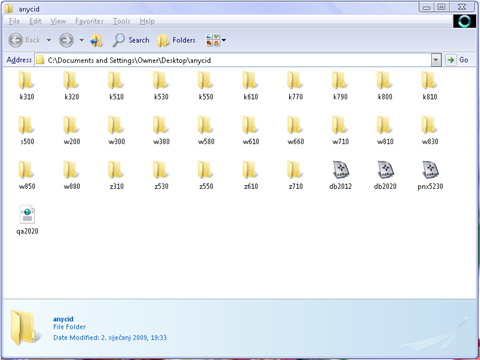
3. Dezarchive DB2012.zip and you will find "customize_upgrade.jar" and "executor.jar"
4. Dezarchive from W200 folder the file matching your firmware and you will find "executor.b"
5. Upload the 3 files in tpa/preset/custom, folosind jdflasher

6. Start the phone, go to file manager/games and start "executor".Now the phone will try to reboot; remove the battery ,and insert it back ,without turning the phone on.
7. Start JDFlasher, press ALT+F1 and select "just da flasher".

8. Select at script "w200" and click on "jump down into a large rabbit hole"; Unselect "RSA"
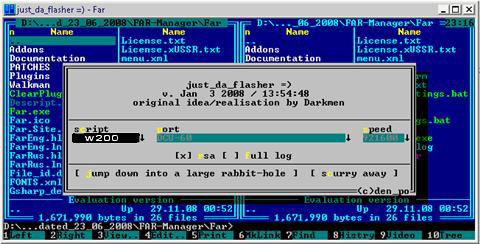
9. Select "bflash" and choose the "rest_file" that was made at 1.

Now u can use any patch made for w200 with the specific firmware ,INCLUDING THE UNLOCK PATCH !
More help can be found by downloading the video guide
More patches for W200 R4HA014 can be found here
Good luck everyone !
** will be posted on first page also (@tutorial)
---------------------------------------------------------------------------------------------------------
As u can see , a new firmware version exist , the R4JA011
to upgrade the firmware u have to use :
W200_R4JA011_FS_C_ASIA_RED52.rar
W200_R4JA011_MAIN_GENERIC_ME_RED52.rar
and the CDA remains the same as the first one : W200_CDA102737_4_Generic_Mediterrain
----------------------------------------------------------------------------------------------------------------------
Usefull links :
www.iprotebe.cz ( need an account , it's free )
http://sonyericssonw200brasil.4shared.com ( a very complex site , that has stuff from a to z , and are free )
<< If u are having trouble finding the right CXC rest file from se-tool, then take a look here >>
W200 retail training ( from sonyericsson.com )
Guide to disassemble the W200 (getting down the skin of it !)
---------------------------------------------------------------------------------------------------------
Cool stuff to be added :
Some very nice accesories to be added are
- cool headsets HPM-70 , HPM-75 , HPM-77 [noise-canceling](big improvement, those along with the right acoustics brings a concert to your ears)
- new LCD screen from K510 (big improvement ,very nice indeed , search the forum for more detalis)
- portable speakers MPS-60 (more of an odd thing because those speakers are as loud as the phone..only the quality and the life of the battery differs)
- M2 memory stick up to 8gb (tested&working perfect)
- BT accesory (never found one , just heard of them)
- Wi-FI accesory (future plan from SE , sayd to be worked only on A2 phones ,but i'm sure it would be OK on every SE with fast-port)
---------------------------------------------------------------------------------------------------------
Very important !!!
If any HARDWARE damages appear to your phone , and/or u need to go to the service , u must flash back with the original firmware files ( Vodafone or Orange )
- orange cid52 R4JA011
- [url="http://rapidshare.co...e.rar"]vodafone cid52 R4JA011
---------------------------------------------------------------------------------------------------------
*this tutorial could be used for other sony ericsson phones as well , you just have to change the firmware & the rest of the files acourding to u're phone . The steps are the same for every CID49 , CID50 , CID51 & CID52 phones using se-tools. Also, for those who already copy-pasted the full tutorial on to they're blogs, or intend to do so , add a "© Alex Herdea" as a respect for the time spent.
regards,
Alex
Edited by alexherdea, 24 May 2010 - 12:23 PM.


 i'll try to post more tutorials as soon as i find them






 as w200 is


