Mini SuperMode
for VGA CAM
Features:
-Manual settings:Photo/Video
-Exposure EV
-Shutter Speed:ISO(Shutter Delay+Shutter Width)/Sharpness
-Saturation/Effects
-Contrast/ Brightness
-White Balance/Color Correction
How to upload camdriver0.dat and
*.lng to phone:
- download XS++ 3.1.(example programm
phone xs++)
- shut down your phone.
- run XS++, click on 'Connect', put USB
cable to your PC, while pressing 'C' key on your phone, put the other side of
cable to your phone, wait XS++ recognize your phone.
- click on FSX™ radio button, click on
'Start FSX', wait a minute or two.
- find IFS/SETTINGS/CAMERA, drag and
drop camdriver0.dat to right window.
- find TPA/PRESET/SYSTEM/LANGUAGE, drag
and drop *.lng to right window.
- in XS++ click on 'Shutdown', then
click on 'Yes'.
- close XS++ and disconnect your phone.
Download
setool (example programm setool)
How to
Proceed in CID 50/51/52 with the program *SETOOL/PHONEXS++/FAR:
*SETOOL USER
GUIDE
1-Unpack
the folder tpa_ifs
2-Copy in
its tpa_ifs this way: ifs/settings/camera
3-Copy the
file "camdriver0" the latest version to the place indicated
4-After
passing your tpa_ifs compressed in *.Zip by SETOOL
5-Press the
button Flash
6- find
TPA/PRESET/SYSTEM/LANGUAGE in MISC FILES click in FLASH botton
7-Wait
finish the process with the message ready
How to use this camdriver: MiniSuperMode for
VGA CAM
-
Changing
Exposure EV: in menu choose Manual settings, choose Exposure,
with joypad you can change its value
|
Value |
-2.0 |
-1.7 |
-1.3 |
-1.0 |
-0.7 |
-0.3 |
0.0 |
+0.3 |
+0.7 |
+1.0 |
+1.3 |
+1.7 |
+2.0 |
|
Equivalent EV |
100% |
85% |
75% |
50% |
25% |
15% |
0% |
15% |
25% |
50% |
75% |
85% |
100% |
- Changing Shutter Speed: in menu
choose Manual settings, choose Shutter Speed:ISO/Sharpness,
with joypad you can change its value.
|
Value |
0.0 |
+0.3 |
+0.7 |
+1.0 |
+1.3 |
+1.7 |
+2.0 |
|
Equivalent ISO/Shutter Speed |
Auto Default |
ISO100/7.5FPS |
ISO125/10FPS |
ISO160/14FPS |
ISO200/15FPS |
ISO320/25FPS |
ISO500/30FPS |
- Changing Sharpness: in menu
choose Manual settings, choose Shutter Speed:ISO/Sharpness,
with joypad you can change its value.
|
Value |
-2.0 |
-1.7 |
-1.3 |
-1.0 |
-0.7 |
-0.3 |
0.0 |
|
Equivalent Sharpness |
+1 Min |
+2 |
+3 |
+4 |
+5 |
+6 Max |
Auto |
- Changing Saturationand
Effects: in menu choose Manual settings, choose Saturation
with joypad you can change its value.
|
Value |
0.0 |
+0.3 |
+0.7 |
+1.0 |
+1.3 |
+1.7 |
+2.0 |
|
Equivalent Saturation |
0% |
15% |
25% |
37.5% |
60% |
85% |
100% full saturation |
- Changing Saturarion
and Effects: in menu choose Manual settings, choose Effects
with joypad you can change its value.
|
Value |
-0.3 |
-0.7 |
-1.0 |
-1.3 |
-1.7 |
-2.0 |
0.0 |
|
Equivalent Sharpness |
Black and
White |
Sepia |
Solarize |
Negative |
Normal |
Normal |
auto |
- Changing Brightnesst: in menu
choose Manualsettings, choose Contrast/ Brightness,
with joypad you can change its value.
|
Value |
-2.0 |
-1.7 |
-1.3 |
-1.0 |
-0.7 |
-0.3 |
0.0 |
|
Equivalent Brightness |
15% |
25% |
35% |
50% |
85% |
100% full |
0 |
- Changing Contrast: in menu
choose Manualsettings, choose Contrast/Brightness ,with
joypad you can change its value.
|
Value |
0.0 |
+0.3 |
+0.7 |
+1.0 |
+1.3 |
+1.7 |
+2.0 |
|
Equivalent Contrast |
0 |
15% |
25% |
50% |
75% |
85% |
100% |
- Changing White Balance: in menu
choose Manualsettings, choose White Balance/Color
Correction,with joypad you can change its value. White Balance is
relative to current white balance.
|
Value |
0.0 |
+0.3 |
+0.7 |
+1.0 |
+1.3 |
+1.7 |
+2.0 |
|
Equivalent White Balance |
Auto |
Normal |
Incandescent
(Tungsten) |
Fluorescent
(white ice or yellow ligth) |
Clear Sky |
Cloudy |
Effect Luminosity |
- Changing Color Correction: inmenu
choose Manual settings, choose White Balance/Color
Correction,with joypad you can change its value. Color Correction is
relative to current color correction.
|
Value |
-2.0 |
-1.7 |
-1.3 |
-1.0 |
-0.7 |
-0.3 |
0.0 |
|
Equivalent Effects |
Color Correction Blue high |
Color Correction Blue low |
Color Correction Green high |
Color Correction Green low |
Color Correction Red high |
Color Correction Red low |
Auto |
BrAzzUkA´s
Thanks to
friends and developers
Alex Herdea
Daniel Vlad Sadeghi SPU, Raiderski, Sadeghi, Sergiober and the others modders
developers
Visit
website:
http://www.esato.com/board/viewtopic.php?topic=159467&start=0
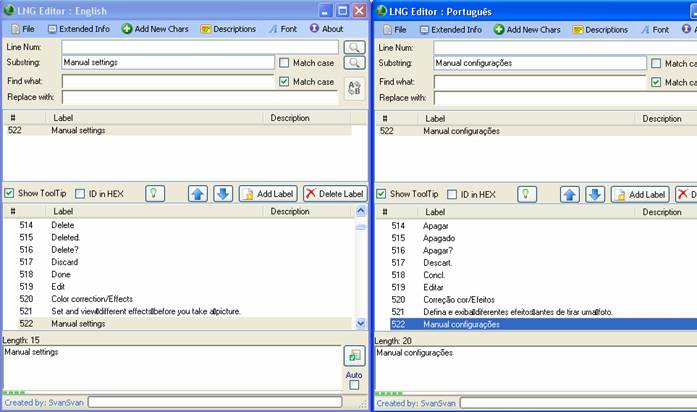
Guide User Language Mini SuperMode
VGA CAM
-Changes version for Mini SuperMode for VGA CAM:
|
Effects |
=> |
Manual Settings |
|
Off |
=> |
Exposure |
|
Black&White |
=> |
White
Balance/Color Correction RGB |
|
Negative |
=> |
Saturation / Effects |
|
Sepia |
=> |
Contrast/ Brightness |
|
Solarize |
=> |
Shutter Speed:ISO/Sharpness |
-Mudanças versão para Mini SuperMode para VGA CAM:
|
Efeitos |
=> |
Manual Configurações |
|
Desativar |
=> |
Exposição |
|
Branco e Negro |
=> |
Equilíbrio de Branco/Correção Cor |
|
Negativo |
=> |
Saturação / Efeitos |
|
Sepia |
=> |
Contraste/Brilho |
|
Clarear |
=> |
Disparo obturador:ISO/Nitidez |
Based on
firmware w200 CID52-R4HA014
Baseado no firmware w200 CID52-R4HA014
Table Manual Settings MiniSuperMode VGA CAM
|
Joypad(+/-) |
Exposure EV |
Contrast/ Brightness |
Saturation/Efeitos |
White
Balance/Color Correction |
Shutter Speed:ISO/ Sharpness |
|
2,0 |
EV+2,0 |
100% |
100% |
Effect Luminosity |
ISO500-30FPS |
|
1,7 |
EV+1,7 |
85% |
85% |
Cloudy |
ISO320-25FPS |
|
1.3 |
EV+1,3 |
75% |
60% |
Clear Sky |
ISO200-15FPS |
|
1,0 |
EV+1,0 |
50% |
37,5% |
Fluorescent
(white ice or yellow ligth) |
ISO160-14FPS |
|
0.7 |
EV+0,7 |
25% |
25% |
Incandescent (Tungsten) |
ISO125-10FPS |
|
0,3 |
EV+0,3 |
15% |
15% |
Auto normal |
ISO100-7.5FPS |
|
0.0 |
AUTO |
AUTO |
AUTO |
AUTO |
AUTO |
|
-0,3 |
EV-0,3 |
100% |
Black&White |
Color Correction red
low |
+6 MAX |
|
-0,7 |
EV-0,7 |
85% |
Sepia |
Color Correction red
high |
+5 |
|
-1,0 |
EV-1,0 |
50% |
Negative |
Color Correction green
low |
+4 |
|
-1,3 |
EV-1,3 |
35% |
Solarize |
Color Correction green
high |
+3 |
|
-1,7 |
EV-1,7 |
25% |
OFF
NORMAL |
Color Correction blue
low |
+2 |
|
-2,0 |
EV-2,0 |
15% |
OFF
NORMAL |
Color Correction blue
high |
+1 MIN |
BrAzzUkA´s
Visit
website:
http://www.esato.com/board/viewtopic.php?topic=159467&start=0